Control reference

Identify controls around the S9 Pro lobby

Names can look self-explanatory, but each control may open a separate workflow. Verify what it does before relying on it.

The destination was supplied by the site owner. This independent guide does not claim to be S9 Pro's official publisher and does not host an APK.

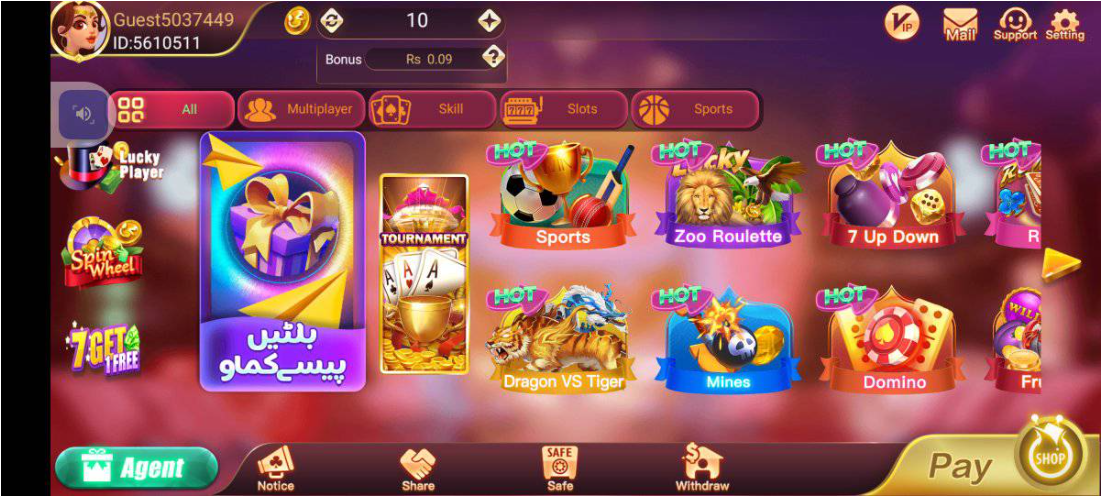
User-supplied S9 lobby screen showing visible navigation categories
User-provided interface reference. Labels and layout may change between releases.
Page intent Interface categories and menu navigation Audience Adults 18+ in Pakistan

Evidence boundary

Interface descriptions on this site come only from the screenshots supplied for this project. Category names, tiles and control positions may differ by build, account or later interface changes.

Information and settings

Notice appears in the lower navigation, while Mail, Support and Setting appear near the upper-right in the supplied screenshot. These are logical places to look for messages, help and preferences.

  • Notice: review account announcements.
  • Mail: read messages without sharing private codes.
  • Support: keep a case reference.
  • Setting: review account and app controls.

Share, Agent and Safe

Share and Agent are visible routes, while Safe appears in the lower bar. The word Safe is an interface label, not a security guarantee or proof of protection.

  • Read live terms before sharing.
  • Do not infer an Agent role from the label.
  • Confirm what Safe stores or controls.

Pay, Withdraw and Shop

These transaction-related labels are visible in the screenshot, but their presence does not establish method availability, withdrawal eligibility or completion.

  • Verify the account and destination.
  • Read current method instructions.
  • Keep references with private data masked.

Fast answers

Questions people ask before the next step

Does the Safe label prove that funds or data are protected?

No. It is a label in the reference interface. Review the feature and current rules before relying on it.

Where is Support in the supplied image?

Support appears near the upper-right controls alongside Mail and Setting.

Should I use Share before reading referral rules?

No. Check the current terms and destination link before sending an invitation.

What this page does not claim

Button descriptions only; no claim about service, security or transaction results

Independent interface reference for adults 18+. Read the current rules before opening a game or using Pay, Withdraw, Share or Agent. A visible button does not confirm availability or an outcome.